Introduction to Token Groups
All of GETMODEL's token groups with their models, pricing, and use cases
GETMODEL divides upstream models into multiple Token Groups by channel, purpose, and price tier. You must choose a group when creating a token, and a token can only call models within its selected group. Choosing the wrong group results in a "model not found" error.
How to view live groups
Click "Model Square" in the top-right corner of the Console to view all groups and the available models under each. The list on this page is updated in real time as models are added or removed, making it more accurate than static documentation.
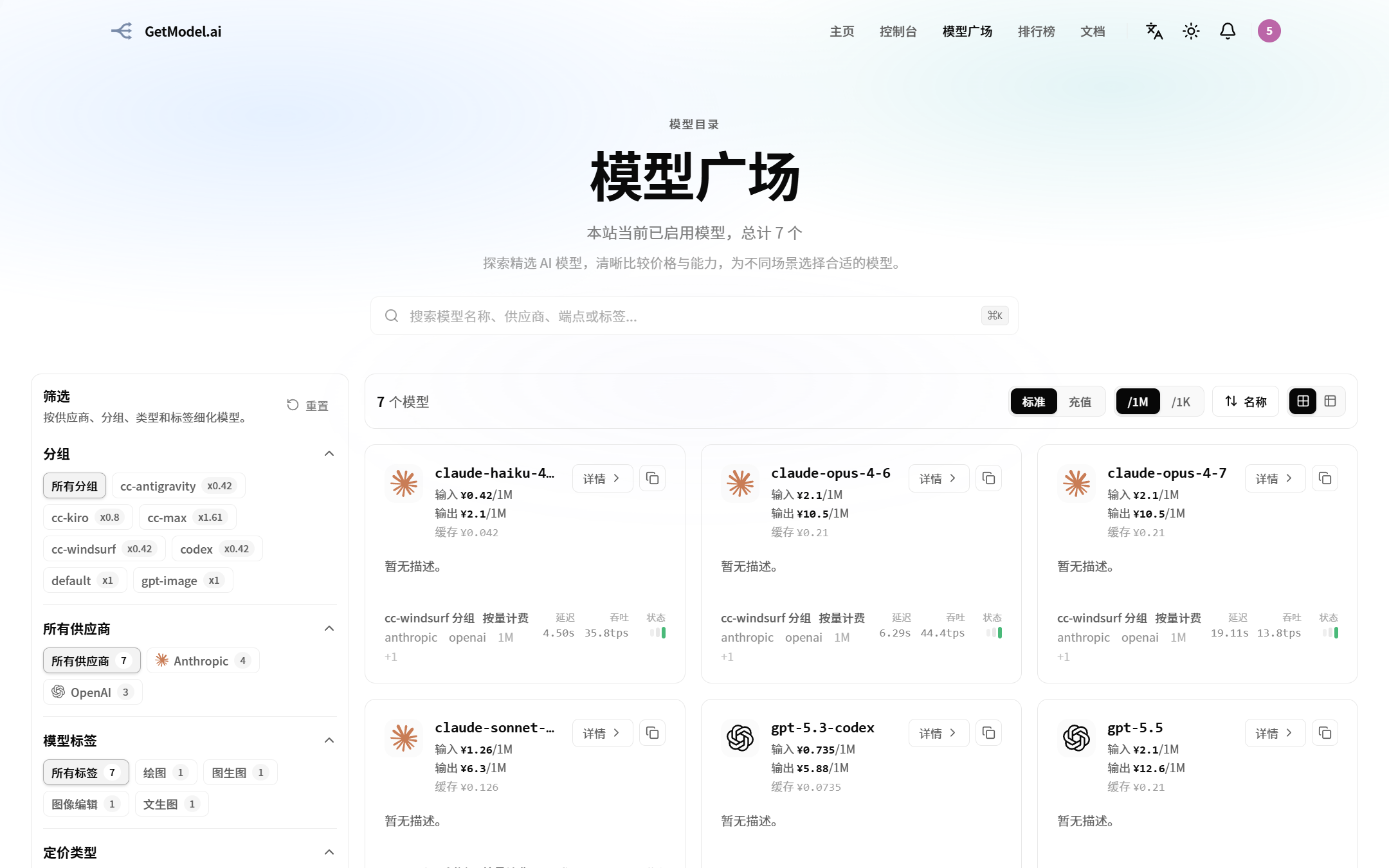
The rate next to each model (e.g. x0.5, x2.5) is that group's billing multiplier:
- Rate < 1 → discounted (
x0.8= 20% off,x0.5= 50% off) - Rate = 1 → base price
- Rate > 1 → surcharge (
x2.5= 2.5x the base price)
Group list
The group names, rates, and model lists below are template examples and need to be filled in based on the groups GETMODEL actually offers. Please contact operations or check "Model Square" in the Console before replacing them.
cc-kiro group
| Item | Value |
|---|---|
| Purpose | Dedicated to Claude Code |
| Rate | x0.8 |
| Third-party support | Yes |
| Applicable tools | Claude Code CLI / Claude Code APP |
| Included models | claude-opus-4-7 / claude-sonnet-4-6 / claude-haiku-4-5-20251001 / claude-opus-4-6 |
Notes: This channel is sourced from a Kiro mirror relay, with above-average stability and occasional rate limiting during peak hours. Its discounted rate (x0.8) makes it stand out on value, well suited for medium-to-high-frequency scenarios in Claude Code such as everyday coding, code review, and agent task orchestration.
codex group
| Item | Value |
|---|---|
| Purpose | Dedicated to Codex CLI |
| Rate | x0.42 |
| Third-party support | Yes |
| Applicable tools | Codex CLI |
| Included models | gpt-5.5 / gpt-5.3-codex |
Notes: This channel is aggregated from OpenAI's official API through third-party relays, optimized specifically for Codex CLI, with good stability and low response latency. Its ultra-low rate (x0.42) offers a strong cost advantage, making it ideal for high-frequency scenarios such as large-scale code completion, batch refactoring, and terminal agent coding. It performs reliably with long contexts and multi-turn tool calls, and is recommended as the go-to group for everyday Codex CLI use.
How do I choose a group?
| Your scenario | Recommended group |
|---|---|
| Writing code in Claude Code | cc-kiro group (best value) |
| Writing code in Codex CLI | codex group |
When in doubt, just look at the model list under each group in "Model Square" — if the list contains the specific model name you want to use, pick that group.